Your Ultimate Guide to the Portable PC: Unlocking Freedom and Productivity
The Portable PC: Your Companion in a Connected World
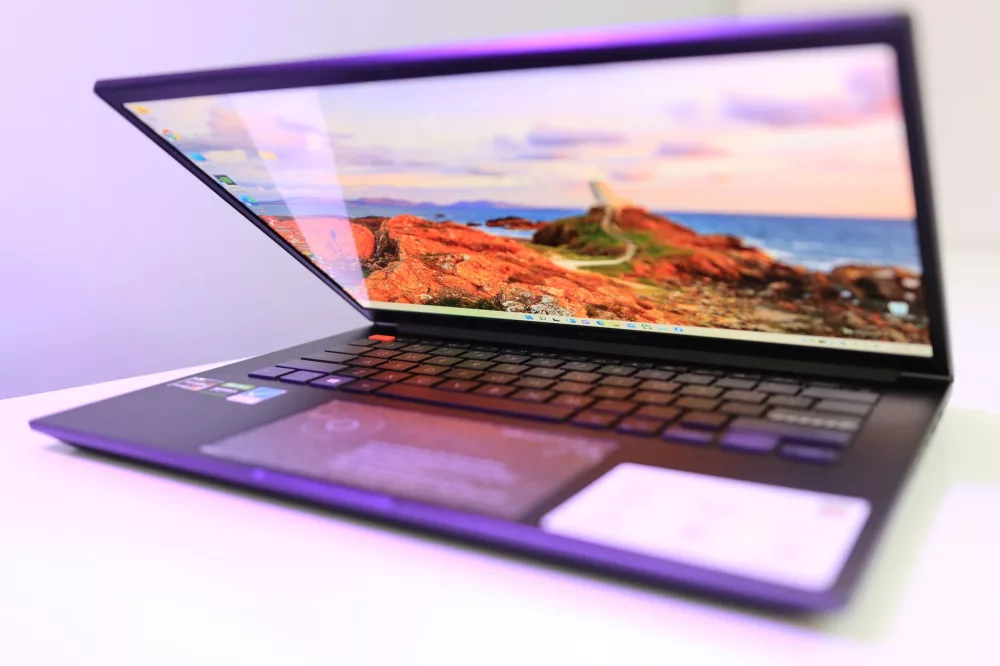
Hey there! If you're anything like me, you probably can't imagine life without a portable PC. What used to be a luxury is now, I'd say, an absolute necessity for most of us. We're talking about laptops, ultrabooks, 2-in-1s – basically, any personal computer you can easily carry around. These aren't just gadgets; they're our windows to the world, our mobile offices, our entertainment hubs, and often, our most trusted creative tools. I mean, think about it: from writing this very article to watching my favorite show on a train, my portable PC is right there with me, making things happen.
For years, desktop computers ruled the roost, offering unparalleled power and upgradeability. But then came the laptop, and boy, did it shake things up! Suddenly, you weren't tethered to a desk. You could work from a coffee shop, study in the library, or game on vacation. This shift wasn't just about convenience; it truly opened up new possibilities for how we live, work, and learn. I honestly don't know where I'd be without the flexibility my laptop gives me. It's truly amazing how far these machines have come.
What to Consider Before You Buy: My Personal Checklist
Choosing the right portable PC can feel a bit overwhelming, I get it. There are so many options out there! But don't sweat it. From my experience, it boils down to a few core things you really need to think about. Let's break it down:
1. Performance: The Heart of Your Machine
- Processor (CPU): This is the brain. For everyday tasks like browsing, email, and word processing, an Intel Core i3/i5 or AMD Ryzen 3/5 is usually fine. If you're into video editing, heavy gaming, or programming, you'll definitely want to lean towards an i7/i9 or Ryzen 7/9. Believe me, you don't want to be staring at a lagging screen when you're on a deadline.
- RAM (Memory): Think of RAM as your PC's short-term memory. 8GB is generally the minimum I'd recommend today for smooth multitasking. If you're a power user or gamer, 16GB is where it's at, and 32GB is for the absolute pros who need everything running at once.
- Storage: This is where your files live. I always suggest an SSD (Solid State Drive) over an old-school HDD. SSDs are lightning fast and make a huge difference in boot times and app loading. You'll want at least 256GB, but 512GB or 1TB is much better if you can swing it. I mean, who wants to constantly manage storage space?
2. Portability: How Much Do You Really Carry?
This one's crucial. Are you constantly on the move, or does your laptop mostly stay at home? I find that a balance is key. If you're commuting daily, you'll appreciate a lighter, thinner model. Weight and size matter a ton here. Battery life is also super important; I always look for something that can give me at least 8-10 hours on a single charge. Nothing's worse than scrambling for an outlet when you're trying to get work done.
3. Display: Your Window to the Digital World
The screen is what you're staring at all day, so make it a good one! Screen size typically ranges from 13 to 17 inches. A 13 or 14-inch model is fantastic for portability, while 15 or 17 inches offers a more immersive experience for gaming or creative work. Resolution is also key; 1080p (Full HD) is the standard, but 4K displays offer incredible detail, especially for media consumption. I always recommend checking out the panel type too – IPS panels usually offer better viewing angles and color accuracy.
4. Build Quality and Design: Durability Meets Style
A portable PC is an investment, right? So you want it to last. Look for sturdy materials like aluminum or high-quality plastics. I also pay attention to hinges; weak hinges can be a real headache down the line. And, let's be honest, we all like a laptop that looks good! Sleek, modern designs are everywhere now, which is great.
5. Keyboard and Trackpad: Your Interaction Points
As someone who types a lot, a comfortable keyboard is non-negotiable for me. Good key travel, proper spacing, and backlighting are all things I consider. The trackpad should be precise and responsive. If you're doing detailed work, you might still want an external mouse, but a good trackpad makes a huge difference for casual use.
6. Connectivity: Ports, Ports, Ports!
What do you need to plug in? USB-A, USB-C (Thunderbolt is a bonus!), HDMI, an SD card reader, and a headphone jack are common. I always make sure it has enough ports for my external monitor and other accessories. Wi-Fi 6 is a great feature for faster internet speeds, and Bluetooth is a given for wireless peripherals.
7. Operating System: Your Software Ecosystem
The choice usually comes down to Windows, macOS, or ChromeOS. Windows offers the widest software compatibility and hardware variety. macOS is known for its intuitive interface, robust security, and creative tools, especially for Apple users. ChromeOS is fantastic for web-centric tasks, offering simplicity, speed, and great battery life, often at a lower price point. I use Windows because of its versatility, but I know plenty of folks who swear by their Macs or Chromebooks.
Different Flavors of Portable PCs
It's not just 'laptops' anymore; we've got specialized categories:
- Ultrabooks: These are super thin, lightweight, and often premium devices, perfect for professionals on the go. Think MacBook Air or Dell XPS.
- Gaming Laptops: Packed with powerful CPUs and dedicated graphics cards, they're built for high-performance gaming, though they're often heavier and have shorter battery lives.
- 2-in-1s (Convertibles/Detachables): These versatile machines can transform from a laptop into a tablet, offering touchscreens and often pen support. Great for artists or students who like to take notes directly on screen.
- Mobile Workstations: These are beasts! Designed for demanding professional tasks like CAD, 3D rendering, or heavy data analysis. They're powerful but usually pretty bulky.
- Chromebooks: Running on Google's ChromeOS, they're typically more affordable, focus on cloud-based applications, and offer fantastic battery life. Great for students or casual users.
Keeping Your Portable PC Happy and Healthy
So, you've got your dream machine. Now, how do you make it last? I've learned a few things over the years:
- Regular Updates: Always keep your operating system and software updated. It's not just for new features; it's crucial for security and performance.
- Cleanliness is Key: Dust and grime are enemies. Gently clean your screen, keyboard, and vents regularly. I use a microfiber cloth for the screen and compressed air for the keyboard.
- Battery Care: Don't always leave it plugged in at 100%. Modern batteries are smarter, but try to keep it between 20% and 80% charge for optimal longevity if you can.
- Security Software: A good antivirus and antimalware program are non-negotiable. Seriously, protect your data!
Honestly, the portable PC landscape is always changing, and that's what makes it so exciting. We're seeing even more powerful processors, stunning displays, and longer battery lives packed into increasingly sleek designs. I can't wait to see what innovations come next. Whether you're a student, a creative professional, a gamer, or just someone who needs to stay connected, there's definitely a portable PC out there that's perfect for your lifestyle. Happy computing!
About Editorial Team
Senior columnist and culture critic specializing in architectural designs, emerging high-growth systems, and contemporary philosophies.